
 QuickEstimate Team

A construction change order is where many profitable jobs quietly turn into break-even ones. The client asks for “just one more outlet”, a wall moves, or you open a floor and find rot. The work gets done, and then the invoice becomes an argument, or the extra work never gets billed at all.
Handled well, change orders protect your margin and your client relationships. This guide explains what a construction change order is, what it must include, how to price it properly, and a simple process that keeps every change in writing before the work starts.
Key takeaways
- A construction change order is a written, signed agreement to change the scope, price or schedule of an existing contract.
- Get every change order approved in writing before the extra work starts.
- Price change orders from real costs, and usually at a higher margin than the base job, because they disrupt the schedule.
- Include the schedule impact, not just the price.
- Keep a change order log so nothing is forgotten when you send the final invoice.
What is a construction change order?
A construction change order is a written amendment to an existing construction contract. It records a change to the agreed scope of work, and the effect that change has on price and schedule. Once both parties sign it, it becomes part of the contract.
Change orders can add work (an extra bathroom fan), remove work (the client decides to keep the old cabinets), or change how work is done (a different tile). They’re a normal part of construction. What causes problems isn’t the change itself, it’s changes that are agreed verbally, priced on the spot, or never written down at all.
On government work, the rules are formal. Under the Federal Acquisition Regulation, Subpart 43.2, change orders on federal contracts are issued in writing by the contracting officer. Private residential jobs are less formal, but the same principle protects you: if it isn’t written and signed, it’s hard to get paid for.
It helps to think of a construction change order as a mini-estimate and a mini-contract in one document. It has its own scope, its own price and its own signature, and it sits alongside the original agreement. Treating it with the same care as the original estimate is what keeps each change profitable. Treating it as an informal favor is what turns a good job into a frustrating one.
Common causes of change orders
- Client-requested changes: upgrades, additions, different finishes, layout changes
- Unforeseen conditions: rot, mold, hidden plumbing or wiring problems, poor soil
- Design errors or omissions: something missing or wrong on the drawings
- Code requirements: an inspector requires something the plans didn’t include
- Material availability: a specified product is unavailable and must be substituted
Many of these can be anticipated. A clear scope and a written list of exclusions and assumptions in your original proposal (“price assumes the subfloor is sound”) makes it obvious when something is a genuine change. Our guide on how to write a construction proposal covers this.
What a construction change order should include
- Reference to the original contract: project name, address, contract date and number
- Change order number and date, so every change can be tracked
- A clear description of the change, in plain language
- The reason: client request, unforeseen condition, code requirement
- Cost breakdown: materials, labor, equipment, subcontractors, overhead and profit, or a lump sum with enough detail to be understood
- Schedule impact: how many days the change adds, if any
- Updated contract total: original price, previous changes, this change, new total
- Payment terms: when the change order amount is due
- Signatures and dates from both parties
A change order template with these fields makes sure nothing is left out, and makes it quick to fill in on site.
Write change order rules into your contract
The easiest construction change order conversations happen when the rules were agreed before the job started. Your original contract or proposal terms should say:
- All changes must be agreed in writing before the work is done
- How changes will be priced: your markup on changes, any admin fee, and your hourly rate for time-and-materials work
- That changes may affect the completion date
- When change order amounts are due, for example with the next progress payment
- How unforeseen conditions will be handled
When a change comes up mid-job, you’re simply following the process the client already agreed to, rather than negotiating from scratch in their kitchen.
The construction change order process, step by step
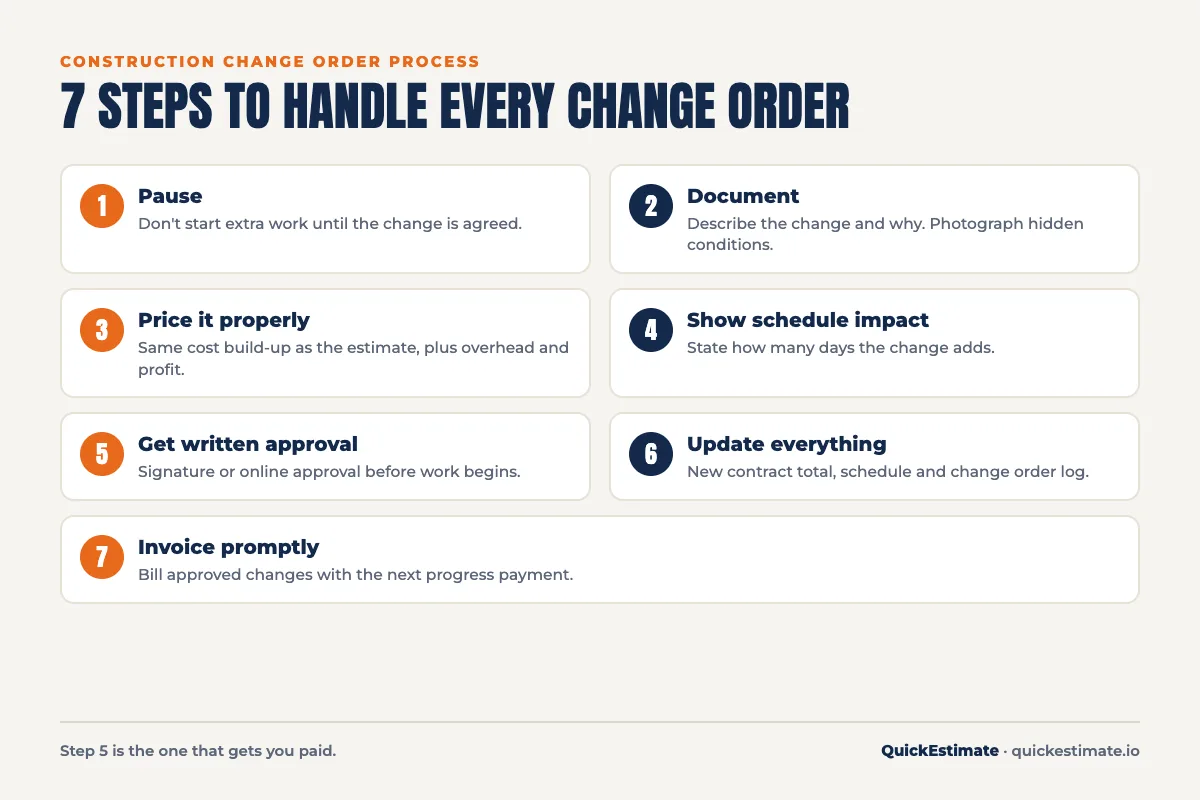
- Pause before doing the work. When a change comes up, don’t start it until it’s agreed. “We’ll sort it out later” is how contractors end up working for free.
- Document the change. Write down exactly what’s changing and why. Take photos of unforeseen conditions.
- Price it properly. Use the same cost build-up as your original estimate, not a guess made on site.
- Include the schedule impact. Extra work usually means extra days.
- Get written approval. A signature or an online approval before the work begins.
- Update the contract total and schedule, and tell your crew and subcontractors.
- Invoice it. Either immediately or on the next progress payment, as your terms state.
How to price a construction change order
Price a construction change order the same way you priced the original job: materials, labor, equipment, subcontractors, overhead and profit. The difference is that change orders usually cost you more per unit than the same work in the original scope:
- Small quantities mean higher material costs and extra supply runs
- The crew stops planned work to do unplanned work
- Subcontractors may need to come back
- There’s extra paperwork, ordering and coordination
That’s why many contractors apply a higher markup to change orders than to the base contract, and some add a fixed administrative fee per change order. Check your contract first, because some contracts set the allowed markup on changes. Whatever you use, make sure the math is right. A 20% markup is only a 16.7% margin, as our guide to markup vs margin explains.
Three ways to price a change
- Lump sum: a fixed price for the change. Clear for the client, best when the change is well defined.
- Time and materials: actual labor hours and materials plus markup. Best for unforeseen conditions where the extent isn’t known yet.
- Unit price: a set price per unit (per outlet, per square foot of drywall). Useful when the quantity isn’t known but the work is repetitive.
Construction change order: worked example
Mid-way through a kitchen remodel, the client asks for four extra recessed lights on a new dimmer. Here’s how the change order is priced:
| Item | Detail | Amount |
|---|---|---|
| Recessed LED lights | 4 × $28 | $112 |
| Dimmer switch | 1 × $35 | $35 |
| Wire, boxes, connectors | $15 | |
| Labor | 3.5 hrs × $45 true cost | $158 |
| Direct cost | $320 | |
| Overhead | 15% | $48 |
| Profit | 20% markup on changes | $74 |
| Change order admin fee | Flat | $75 |
| Change order total | $517 |
The change order also notes half a day added to the schedule, and states that the new contract total is the original price plus $517. The client approves it online before the electrician returns. When the final invoice goes out, there’s no debate. The change is documented, priced and signed.
Handling unforeseen conditions
Hidden problems, such as rotten subfloor, termite damage or knob-and-tube wiring, are the most stressful change orders because the client didn’t choose them. A few things make them easier:
- Anticipate them in the original proposal. An assumptions line (“price assumes existing framing is sound; repairs will be priced as a change order”) sets expectations early.
- Stop and show the client. Photos and a quick walkthrough build trust.
- Offer options where possible. Repair vs replace, or a temporary fix vs a permanent one.
- Use time and materials if the extent is unknown, with a not-to-exceed amount the client approves.
Deductive change orders and credits
Not every change adds money. If the client removes work, a deductive change order records the credit. Be fair but careful: you’ve usually already incurred some costs, such as ordered materials, scheduled labor and restocking fees. A deduction should reflect the costs you actually save, not the full line price in the original estimate.
How to talk to clients about change orders
Many clients hear “change order” and assume you’re trying to charge more. How you raise it matters:
- Raise it immediately. The moment you spot a change, tell the client. Surprises on the final invoice destroy trust.
- Explain the why. “The drawings show a single switch, but you’ve asked for two locations. That needs an extra switch and wiring.”
- Show the options. Many changes have a cheaper alternative. Offer it.
- Keep it calm and routine. Present change orders as a normal part of every project, because they are.
- Confirm in writing, even after a friendly conversation.
Clients who understand the process early are far less likely to push back later. Mentioning it at the contract signing (“if anything changes, we’ll send a quick change order for you to approve before we do it”) sets the tone for the whole job.
Change orders for subcontractors
If you’re a subcontractor, the same rules apply, with one extra layer: your change order goes to the general contractor, who may need their own change order from the owner before they can pay you. That can take time. Protect yourself by:
- Getting written direction from the GC before doing extra work, even if the owner asked you directly
- Submitting your construction change order promptly with clear backup: photos, quantities and pricing
- Following the notice deadlines in your subcontract, since late notice can mean no payment
- Tracking each change until it’s paid, not just approved
Change order vs directive vs allowance
A few related terms often get mixed up:
- Change order: an agreed change to scope, price and schedule, signed by both parties.
- Construction change directive: used on some contracts when the owner instructs a change before the price is agreed. The work proceeds and the price is settled later.
- Allowance: a placeholder amount in the original contract for items not yet chosen, such as fixtures. If the client’s choice costs more or less, the difference is adjusted, often through a change order.
Using allowances well reduces change orders. A realistic fixture allowance means fewer surprises when the client makes their final selections.
Keep a change order log
On any job with more than one change, keep a simple log:
| CO # | Date | Description | Amount | Days | Status |
|---|---|---|---|---|---|
| 1 | Mar 4 | Add 4 recessed lights + dimmer | $517 | +0.5 | Approved |
| 2 | Mar 9 | Replace rotten subfloor (T&M, NTE $1,200) | $960 | +1 | Approved |
| 3 | Mar 12 | Delete pantry shelving | −$240 | 0 | Pending |
The log makes the final invoice simple, and it shows the client exactly how the price changed and why.
How change orders affect cash flow
Change orders don’t just affect profit. They affect when you get paid. If approved changes aren’t billed until the final invoice, you’re carrying the cost of materials and labor for weeks, sometimes months. On a job with several changes, that can tie up a lot of cash.
Fix it in your terms: state that approved change orders are due with the next progress payment, or require a deposit on larger changes before materials are ordered. Invoice promptly, and include the change order number on the invoice so the client can match it to what they signed. Our guide to calculating your contractor hourly rate also covers why unbilled time hurts more than it looks.
Construction change order checklist
- Change described clearly, with the reason
- Photos taken of any unforeseen condition
- Priced from real costs, with overhead and profit
- Pricing method stated: lump sum, time and materials or unit price
- Schedule impact included
- Updated contract total shown
- Payment terms stated
- Signed or approved online before the work starts
- Added to the change order log and next invoice
Change order mistakes that cost contractors money
- Doing the work before it’s approved. The single biggest cause of unpaid extras.
- Verbal agreements. Memories differ by the time the invoice arrives.
- Pricing on the spot. Quick guesses on site are almost always too low.
- Ignoring the schedule. Extra work pushes out the finish date. Say so in writing.
- Giving away small changes. Five “small favors” can add up to a lost profit margin.
- Waiting until the end to bill. Invoice approved changes promptly so they don’t pile up.
Manage change orders with software
Paper change orders get lost, and spreadsheets don’t tell you whether the client has signed. With QuickEstimate you can create a change order from the original estimate, price it with your saved rates, send it for online approval and keep every version with the project. The client sees exactly what changed, and you see exactly what’s approved before the crew starts.
Frequently asked questions
What is a change order in construction?
A construction change order is a written amendment to an existing contract that changes the scope of work, and usually the price and schedule. Once signed by both parties, it becomes part of the contract.
Who pays for a construction change order?
Usually whoever caused the change: the client for requested changes, and often the client for unforeseen conditions if the contract says so. Design errors and contractor mistakes are handled according to the contract terms.
How much should I mark up a change order?
Many contractors use a higher markup on change orders than on the base contract, because changes cost more to manage. Check your contract, since some limit the markup on changes, and make sure your overhead is covered.
Can a contractor refuse a change order?
Often yes on private work, depending on the contract, especially if the change is outside your trade or would affect safety. On some contracts, particularly public ones, you may be required to perform directed changes. Read your contract terms.
Should change orders be signed before the work starts?
Yes. Getting written approval before starting the extra work is the best protection against payment disputes.
What happens if the client refuses to sign a change order?
Don’t do the extra work until the disagreement is resolved. Explain the reason for the change, offer alternatives, and refer back to your contract terms. If it’s an unforeseen condition that must be fixed, document it thoroughly with photos and dates.
How many change orders are normal on a project?
It varies widely. Small, well-defined jobs may have none. Remodels in older homes often have several because of hidden conditions and client decisions made during the work. A clear original scope and realistic allowances keep the number down.
Can I use a change order template?
Yes, and you should. A change order template makes sure every change includes the description, reason, price, schedule impact, updated total and signatures, and it’s much faster to fill in on site than writing from scratch.
The bottom line
A construction change order is a normal part of almost every job. What separates profitable contractors is how they handle it: stop, document, price properly, get approval in writing, update the schedule and bill promptly. Do that every time and changes become extra profit instead of extra stress.
Want change orders your clients can approve online? Try QuickEstimate free and keep every change documented, priced and signed.